💰 Chargeable Cushion Upgrades
✅ Checklist
-
ABN signed by patient?
-
Claim Note added with Base Equipment info?
-
Line 1 (Upgrade) has
GAmodifier? -
Line 2 (Base) has
GKmodifier? -
POD notes added to both lines?
Scenario
Use this workflow when a patient wants a specific cushion that is not medically necessary (or is an upgrade to the covered item) and they have signed an ABN agreeing to pay the difference.
Step 1: Sales Order Setup & Claim Notes
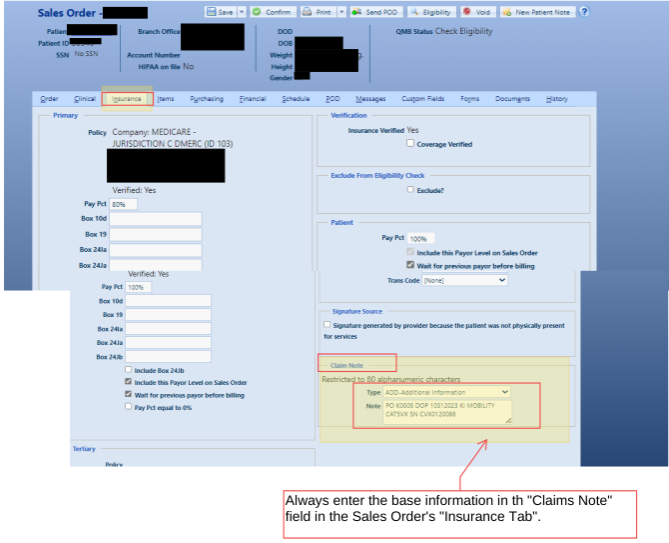
Before entering items, you must document the Base Equipment (the wheelchair) in the claim notes so Medicare knows what this cushion is attaching to1.
-
Go to the Insurance tab on the Sales Order.
-
Locate the Claim Note section (bottom right)
-
Set Type to
ADD - Additional Information -
Enter the base equipment info (max 80 characters)
- Format Example:
RO K0005 DOP 10/31/2023 KI MOBILITY CATSVX SN CVX01:20086
- Format Example:
Step 2: Line Item Entry (The Math)
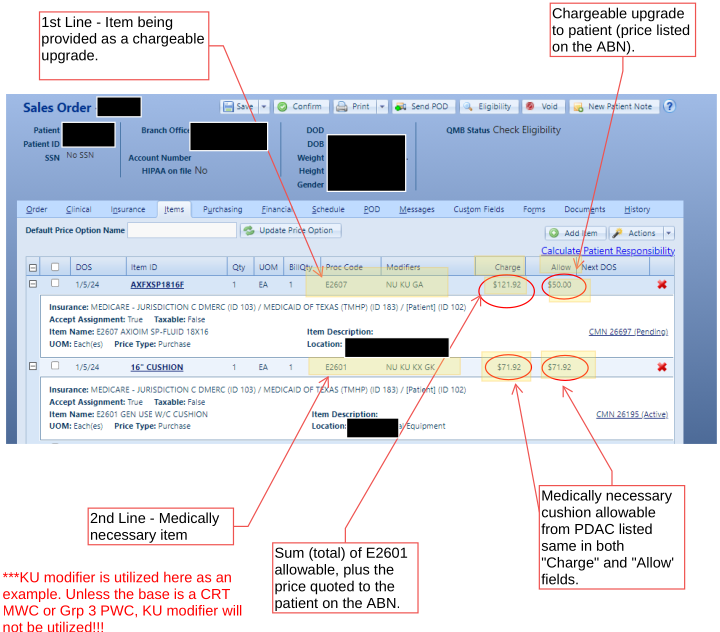
You must enter two line items: the item the patient is actually getting (the upgrade) and the item Medicare would have paid for (the base)6.
Line 1: The Upgrade Item (Actual Provide)
-
Item: Select the actual upgrade cushion being provided.
-
Price Type: Purchase.
-
Allow Field: Enter the Upgrade Charge (Price quoted to patient on ABN).
-
Charge Field: Enter the Total (Upgrade Charge + Base Allowable).
-
Modifiers:
NU,GA(ABN on file).- _(Note: Only add
KUif the base is a Group 3 Power Chair or CRT Manual Chair)_10.
- _(Note: Only add
Line 2: The Medically Necessary Item (Shadow Bill)
-
Item: Select the standard cushion code (e.g., E2601)
-
Price Type: Purchase.
-
Allow Field: Enter the PDAC Allowable for this code.
-
Charge Field: Enter the PDAC Allowable (Must match the Allow field).
-
Modifiers:
NU,GK(Reasonable and necessary item associated with GA),KX(Requirements met).
Pricing Example (E2601 Base)
- Base Allowable (E2601): 50.00 16
Line Item Charge Allow Modifiers 1 Upgrade (Actual) $121.92 $50.00 NU GA 2 Base (Shadow) $71.92 $71.92 NU GK KX
Step 3: POD & Item Notes
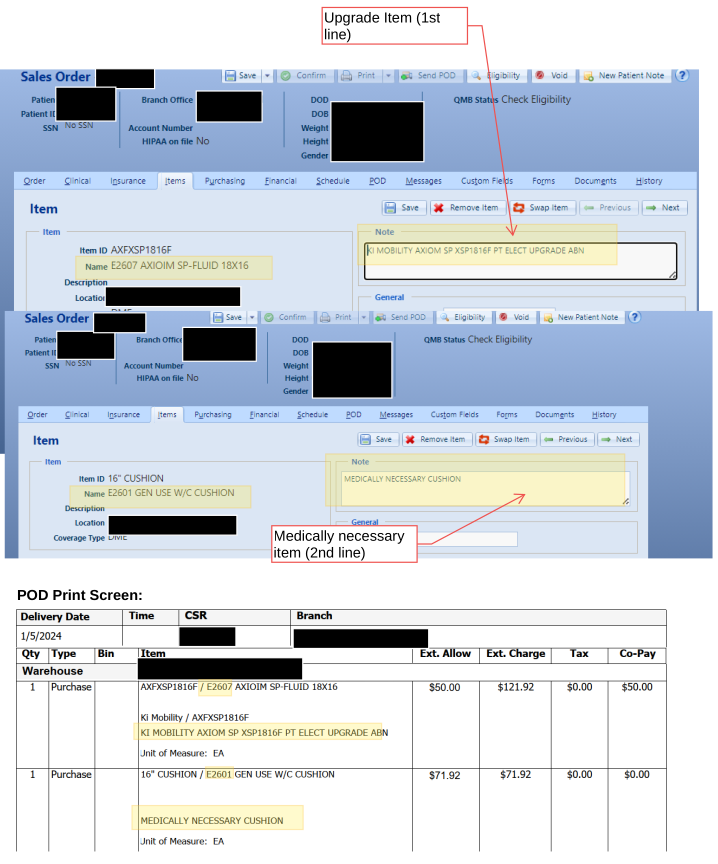
To ensure the Proof of Delivery (POD) is compliant and clear to the patient, you must add specific notes to the Item Tab for each line17.
For the Upgrade Item (Line 1)
Add a note identifying this as the patient election.
-
Text:
[MANUFACTURER/MODEL] PT ELECT UPGRADE ABN.- Example:
KI MOBILITY AXIOM SP XSP1816F PT ELECT UPGRADE ABN
- Example:
For the Base Item (Line 2)
Add a note clarifying this is the billing reference only.
- Text:
MEDICALLY NECESSARY CUSHION.
PDAC Compliance
Medicare requires all cushions billed for coverage to be PDAC approved. Ensure the POD reflects the specific Make and Model # of the cushion actually provided to verify PDAC approval20.